The CommandType enumeration decides what type of object a command will be executed as. The CommandType enumeration can have any of the three values defined in table 5-25.
Table 5-25. The CommandType Enumeration Members
|
MEMBER
|
DESCRIPTION
|
|
StoredProcedure
|
The name of the stored procedure.
|
|
TableDirect
|
The CommandText property should be set to the table name, and all rows and column in the table will be returned.
|
|
Text
|
A SQL text command.
|
As you can see from Table 5-25, you can call a stored procedure, use TableDirect, or execute a SQL command. I'll present these options one by one in the following sections.
Calling a Stored Procedure
Executing stored procedures using the Command object is similar to executing a SQL query. In this section you're going to see a quick overview on how to execute stored procedures.
You need to set the CommandType property of a Command object before calling a stored procedure. By default, the CommandType property is Text. If you want to call a stored procedure, you need to set the CommandType to StoredProcedure and the CommandText to the stored procedure name. After that you call the ExcuteReader method or other methods. You can also pass parameters to the procedure by setting parameter object. You can also pass a procedure name as a string when creating a Command object. Listing 5-32 shows the setting of the CommandType and CommandText properties of Sqlcommand. As you can see, it calls an existing SQL server Northwind database stored procedure, Sales By Year.
Listing 5-32. Calling a stored procedure using SqlCommand
' Create a SqlCommand with stored procedure as string
Dim cmd As New SqlCommand(" Sales By year", conn)
' Set command's command type as StoredProcedure
cmd.CommandType = CommandType.StoredProcedure
Note: Executing stored procedures can be helpful in improving the performance of an application in multi-user and Web applications because a stored procedure executes on the server itself.
The Northwind database in SQL server contains a few stored procedures. One is called Sales By Year (see Listing 5-33).
Listing 5-33. Stored procedure Sales By Year in Northwind
ALTER procedure [Sales by Year]
@ Beginning_Date DateTime, @ Ending_Date DateTime AS
SELECT Orders.ShippedDate, Order.OrderID, "Order subtotals".Subtotal,
DATENAME(yy, Shipper Date) As year
FROM Orders INNER JOIN "Order Subtotals" ON Order.OrderID =
"Order Subtotals". OrderID WHERE Orders.ShipperDate
Between @Beginning_Date And @Ending_Date
This stored procedure takes two parameters, Beginning_Date and Ending_Date. The procedure will select all of the orders between these two dates. It also performs a join with the Order Subtotals from the Order Subtotal view, which calculates the subtotals of each. If you want to execute this stored procedure in ADO.NET, you just create a Command object of type StoredProcedure and call ExecuteReader. You then cycle through the results in the reader that you're looking for from your stored procedure. Listing 5-34 executes a stored procedure that selects all the orders in July and displays their order IDs.
Listing 5-34. Executing and reading the results of a stored procedure in ADO.NET
Private Shared Sub Main(ByVal args As String())
' Create a Connection object
Dim ConnectionString As String = "Integrated Security = SSPI; " & "Initial Catalog=Northwind; " & "Data Source= MAIN-SERVER; "
Dim conn As New SqlConnection(ConnectionString)
' create a SqlCommand with stored procedure as string
Dim cmd As New SqlCommand("Sales by year ", conn)
' set command's CommandType as StoredProcedure
cmd.CommandType = CommandType.StoredProcedure
' Create a SqlParameter and add a parameter
Dim parm1 As SqlParameter = cmd.Parameters.Add("@Beginning_Date", SqlDbType.DateTime, 20)
parm1.Value = "7/1/1996"
Dim parm2 As SqlParameter = cmd.Parameters.Add("@Ending_Date", SqlDbType.DateTime, 20)
parm2.Value = "8/1/1996"
' open the connection
conn.Open()
' call ExcuteReader to execute the stored procedure
Dim reader As SqlDataReader = cmd.ExecuteReader()
Dim orderlist As String = ""
' Read data from the reader
While reader.Read()
Dim result As String = reader("OrderID").ToString()
orderlist += result + ControlChars.Lf
End While
' close the connection and reader
reader.Close()
conn.Close()
' print data on the console
Console.WriteLine("Orders in July")
Console.WriteLine("= = = = = = = =")
Console.WriteLine(orderlist)
End Sub
The result of calling a stored procedure in listing 5-34 look like Figure 5-32.
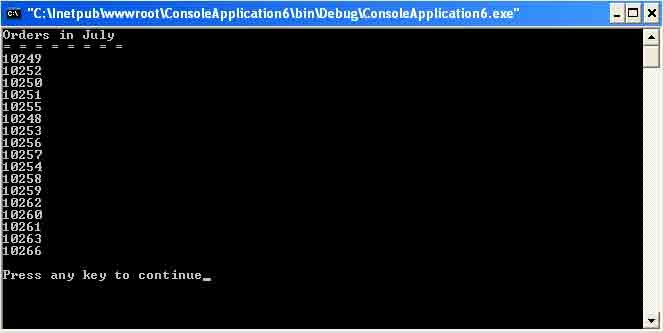
Figure 5-32. Order IDs in the month of July in Northwind
If you wanted to look at the subtotals along with orders, you'd just add a DataReader index for dereferencing the subtotal and concatenate with the OrderID. The new DataReader loop looks like Listing 5-35.
Listing 5-35. Adding the subtotal listing to the output of the stored procedure results
While reader.Read()
Dim nextID As String = reader("OrderID").ToString()
Dim nextSubtotal As String = reader("Subtotal").ToString()
orderlist += nextID + ControlChars.Tab + nextSubtotal + ControlChars.Lf
End While
The result of replacing this line of code in Listing 5-35 gives output that looks like Figure 5-33.
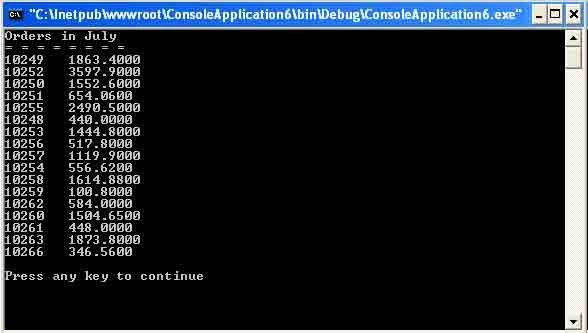
Figure 5-33. Order IDs and subtotal in the month of July in North wind
Using TableDirect
You can also use the TableDirectCommandType to read information directly from a table. There are two changes you need to make in the example to execute a table setting TableDirect. First, you need to set Command's CommandText property as the table name; second, set the CommandType property as CommandType.TableDirect.
The following code reads the Customers table and sets the CommandType property as CommandType.TableDirect:
cmd.CommandText = " Customers"
cmd.CommandType = CommandType.TableDirect
Listing 5-36 reads information from the Customers table by setting the TableDirect method and displaying it on the console.
Listing 5-36. Using TableDirect to read a table
Private Shared Sub Main(ByVal args As String())
' create a connection object
Dim ConnectionString As String = "Provider=Microsoft.Jet.OLEDB.4.0;" & " Data Source = C:/northwind.mdb "
Dim conn As New OleDbConnection(ConnectionString)
Dim cmd As New OleDbCommand()
cmd.Connection = conn
cmd.CommandText = "Customers"
cmd.CommandType = CommandType.TableDirect
conn.Open()
Dim reader As OleDbDataReader = cmd.ExecuteReader()
Console.WriteLine("Customer Id, Contact Name, Company Name")
Console.WriteLine("========================================")
While reader.Read()
Console.Write(reader("CustomerID").ToString())
Console.Write(", " & reader("ContactName").ToString())
Console.WriteLine(", " & reader("CompanyName").ToString())
End While
' release objects
reader.Close()
conn.Close()
End Sub
The output of Listing 5-36 looks like Figure 5-34.
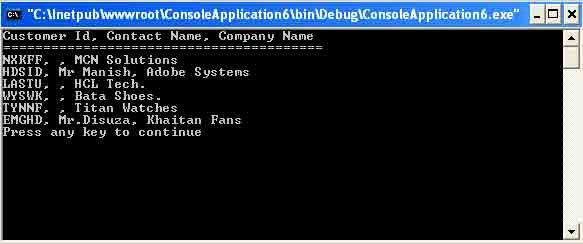
Figure 5-34. Result of the Customers table using TableDirect
Executing the Command
You just saw the ExecuteReader method, which reads data from a data source and fills the data reader object depending on the data provider. Besides the ExecuteReader, the Command object defines three more execute methods. These methods are ExecuteNonQuery, ExecuteScalar, and ExecuteXmlRaeder. The ExecuteReader method produces a DataReader. The DataReader is the solution for forward streaming data through ADO.NET. (I'll discuss it in more detail later in this article.)
The ExecuteNonQuery allows you to execute a SQL statement or a Command object with the CommandText property having a SQL statement without using a DataSet.
For example, you could have an UPDATE, INSERT, or DELETE statement in your CommandText and then call ExecuteNonQuery to execute it directly on your database.
Note: You don't ExecuteNonQuery to execute a SELECT statement because ExecuteNonQuery doesn't return data.
Listing 5-37 is an example of inserting a row into the Northwind database using ExecuteNonQuery. You can even use UPDATE and DELETE SQL queries to update and delete data from database. I'll use these statements in later examples. Here you create an INSERT query and call ExecuteNonQuery.
Listing 5-37. Adding records to table using the INSERT SQL statement
Private Shared Sub Main(ByVal args As String())
' create a connection object
Dim ConnectionString As String = "Provider = Microsoft.Jet.OLEDB.4.0;" & " Data Source= c:\ Northwind.mdb"
Dim conn As New OleDbConnection(ConnectionString)
' open an existing connection to the Database and create a
' Command Object with it:
conn.Open()
Dim cmd As New OleDbCommand("Customers", conn)
' Assign the SQL Insert statement we want to execute to the command text
cmd.CommandText = "INSERT INTO Customers " & "(Address, City, CompanyName, ContactName, CustomerID)" & "VALUES ('111 Broad st.', 'NY', 'Xerox' , 'Fred Biggles', 1400)"
' Call Execute Non Query on the Command Object to execute insert cmd.ExecuteNonQuert();
' release objects
conn.Close()
End Sub
The ExecuteScalar is useful method for performing a SQL statement that retrieves a single value. A good Example of this is retrieving the number of rows from a database. Listing 5-38 retrieves the number of rows from the Customers table in Northwind. Then you assign the SQL command for getting the row count in customers to the Command object, and you call ExecuteScalar to retrieve the counter.
Listing 5-38. Using the ExecuteScalar method to retrieve a Single value
Private Shared Sub Main(ByVal args As String())
' Create a connection object
Dim ConnectionString As String = "Provider=Microsoft.Jet.OLEDB.4.0;" & "Data Source= C:/Northwind.mdb"
Dim conn As New OleDbConnection(ConnectionString)
' Creating a command object
conn.Open()
Dim cmd As New OleDbCommand()
cmd.CommandText = "SELECT Count (*) FROM Customers"
cmd.Connection = conn
Dim counter As Integer = CInt(cmd.ExecuteScalar())
Console.WriteLine("Total rows returned are :" & counter.ToString())
' release objects
conn.Close()
End Sub
Figure 5-35 shows the output of Listings 5-38.
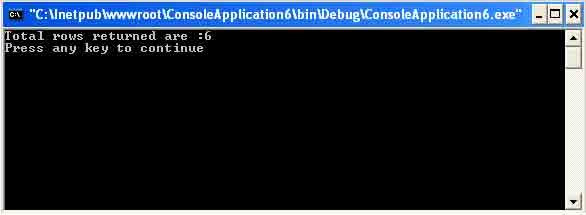
Figure 5-35. Output of an ExecuteScalar showing the number of customers
The ExecuteXmlReader method returns the result in an XmlReader.
Conclusion
Hope this article would have helped you in understanding the CommandType Enumeration in ADO.NET. See my other articles on the website on ADO.NET.