PrintPreview Control in VB.NET
PrintPreviewControl control represents the raw part of print preview of a document that is ready go to the printer. In this article, I will discuss how to use a PrintPreviewControl control to display print previews of documents in Windows Forms applications.
PrintPreviewDialog control display the Print Preview Dialog with all buttons and settings where users can change their settings before a document goes to the printer. But there are circumstances when you would need to just display print preview without any buttons and options and use can only see the preview. This is where the PrintPreviewControl comes in picture.
PrintPreviewControl control represents the raw part of print preview of a document that is ready go to the printer. In this article, I will discuss how to use a PrintPreviewControl control to display print previews of documents in Windows Forms applications.
Creating a PrintPreviewControl
PrintPreviewControl is defined in the System.Drawing.Printing namespace. You must import this namespace before using the PrintPreviewControl class.
We can create a PrintPreviewControl by dragging the control from Toolbox onto a Form or we can use the PrintPreviewControl class.
The following code snippet creates a PrintPreviewControl, sets its properties and adds control to the Form by calling Controls.Add() method.
C# Code:
private PrintPreviewControl ppc;
private PrintDocument docToPrint = new PrintDocument();
private void CreatePrintPreviewControl()
{
ppc = new PrintPreviewControl();
ppc.Name = "PrintPreviewControl1";
ppc.Dock = DockStyle.Fill;
ppc.Location = new Point(88, 80);
ppc.Document = docToPrint;
ppc.Zoom = 0.25;
ppc.Document.DocumentName = "c:\\";
ppc.UseAntiAlias = true;
// Add PrintPreviewControl to Form
Controls.Add(this.ppc);
}
VB.NET Code:
Private Sub CreatePrintPreviewControl()
ppc = New PrintPreviewControl()
ppc.Name = "PrintPreviewControl1"
ppc.Dock = DockStyle.Fill
ppc.Location = New Point(88, 80)
ppc.Document = docToPrint
ppc.Zoom = 0.25
ppc.Document.DocumentName = "c:\"
ppc.UseAntiAlias = True
AddHandler docToPrint.PrintPage, AddressOf PrintPage
' Add PrintPreviewControl to Form
Controls.Add(ppc)
End Sub
Adding PrintDocument.PrintPage Event Handler
Remember, a PrintPreviewControl displays preview only and do not print a document. To print a document, we must implement PrintDocument.PrintPage event handler. The following code snippet add PrintDocument.PrintPage event handler and prints some text using the DrawString method of Graphics object.
C# Code:
// Add PrintDocument PrintPage event handler
this.docToPrint.PrintPage +=
new System.Drawing.Printing.PrintPageEventHandler(PrintPage);
private void PrintPage(object sender, PrintPageEventArgs e)
{
string text = "This text to be printed. ";
e.Graphics.DrawString(text, new Font("Georgia", 35, FontStyle.Bold),
Brushes.Black, 10, 10);
}
VB.NET Code:
AddHandler docToPrint.PrintPage, AddressOf PrintPage
Private Sub PrintPage(ByVal sender As Object, ByVal e As PrintPageEventArgs)
Dim text As String = "This text to be printed. "
e.Graphics.DrawString(text, New Font("Georgia", 35, FontStyle.Bold),
Brushes.Black, 10, 10)
End Sub
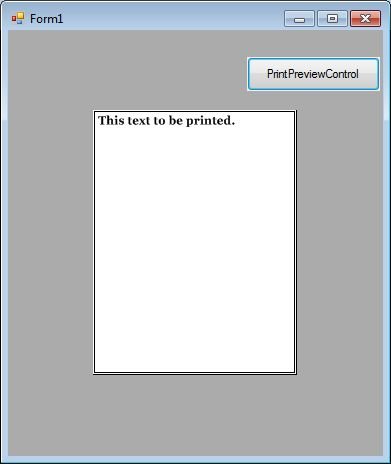
The output looks like Figure 1 where the print preview of a document to be printed is displayed.
Summary
In this article, we discussed discuss how to use a PrintPreviewControl control to display print preview of documents in Windows Forms applications. Download the attached project to learn more about this control.